FlightOps Airport Database CLI Simulator

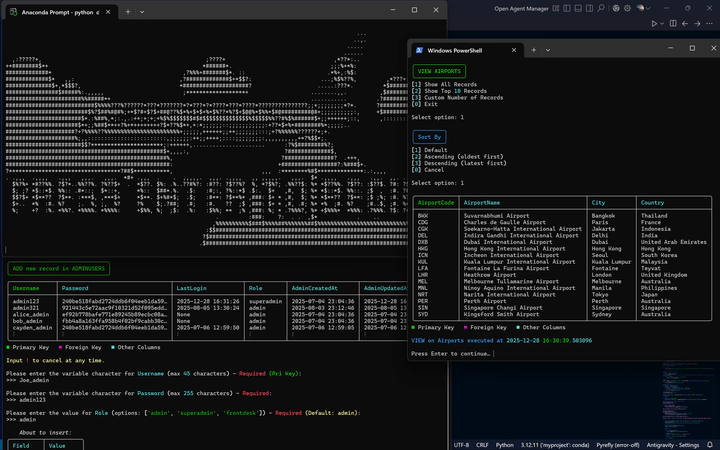 Image credit: Me
Table of Contents
 GitHub Repository
Overview
FlightOps Manager is a Python + MySQL CLI system designed to simulate core airport operational workflows in a realistic aviation domain.
Built for Database Design & Applications (EGE311), it demonstrates 3NF relational modelling, enforced integrity constraints, and a production-inspired operational layer with:
- Role-based access control (Front Desk / Admin / Superadmin)
- Schema-driven CRUD workflows across operational tables
- Full audit logging (CREATE / READ / UPDATE / DELETE) for accountability
- A polished Rich-powered terminal UI with guided input + validation guardrails
Problem
Airport operations contain tightly linked data: flights, aircraft assignment, crew scheduling, passenger identity, bookings, and movement records (arrivals/departures).
Spreadsheet workflows struggle with:
- Integrity (invalid references, duplicated IDs, broken relationships)
- Security (everyone can edit everything)
- Traceability (no accountability of who changed what and when)
FlightOps solves this by combining a normalized MySQL schema, referential constraints, role separation, and audit trails in a structured CLI workflow.
Database Design (Normalisation → 3NF)
Before vs After ERD
The project begins with an unnormalized/early-stage ERD and progresses to a fully normalized 3NF schema.


Core Entities & Relationships (Logical Schema)
Tables (11 total):Airports, Planes, Flights, Arrivals, Departures, Employees, Passengers, Bookings, FlightCrew, AdminUsers, AuditLog
Key relationships implemented via FK constraints (from database.sql):
- Airports (1) → Planes (M) via
Planes.BaseAirportCode → Airports.AirportCode - Planes (1) → Flights (M) via
Flights.AircraftID → Planes.AircraftID - Flights (1) → Arrivals / Departures (M) via
Arrivals.FlightID,Departures.FlightID - Flights (M) ↔ Employees (M) via junction table FlightCrew
- Composite PK: (
FlightID,EmployeeID)
- Composite PK: (
- Passengers (1) → Bookings (M) via
Bookings.PassengerID → Passengers.PassengerID - AuditLog references users with
ON DELETE SET NULLto preserve logs even after user removal.
Key Features (with Screenshots)
1) Role-Based Access Control (RBAC)
- Front Desk: view-only access to limited operational tables
- Admin: CRUD on operational tables
- Superadmin: full control, including AdminUsers and AuditLog


2) Schema-Driven CRUD (Dynamic Prompts + Validation)
The CLI introspects table structure at runtime using:
DESCRIBE <table>for columns + PK detectioninformation_schema.KEY_COLUMN_USAGEfor FK references
This enables generic CRUD workflows across many entities without hardcoding forms.
CRUD Menu

ADD (Create)


VIEW (Read)

UPDATE


DELETE


3) Composite Primary Key Handling (FlightCrew)
For junction tables like FlightCrew, the system:
- detects composite PK columns
- forces user to input the full PK combination
- validates uniqueness before insert/update
(Composite PK support is explicitly noted in project specs and implemented in code via PK column detection + uniqueness checks.)
4) Sorting / Record Viewing Controls
Records can be displayed as:
- all rows
- top 10
- custom N
and optionally sorted by the appropriate timestamp column: CreatedAtfor most operational tablesAdminCreatedAtfor AdminUsersTimestampfor AuditLog


5) Audit Logging (Accountability by Design)
Every action generates an audit record containing:
Username,TableName,ActionType,Details,Timestamp
AuditLog is viewable only by Superadmin and cannot be modified through normal workflows.


6) ASCII Animation Splash Screen (Intro Sequence)
To enhance UX, the program plays an animated ASCII splash at startup (purely cosmetic).
The CLI loads pre-generated ASCII frames from a text file (e.g., frames.txt) and renders them in sequence in the terminal.
- The animation does not affect database functionality or CRUD logic
- Frames are stored as newline-separated blocks, making them easy to parse and play
- Frames were generated using a separate utility tool (see Appendix A)
Security & Access Control
- Admin authentication uses SHA-256 hashing (
hashlib.sha256) - LastLogin timestamp is updated on successful login
- Front Desk mode is accessible as a restricted view-only role
- SQL injection is avoided via parameterized queries (
Cursor.execute(SQL, params))
Tech Stack
- Language: Python 3
- Database: MySQL 8.0 (
sg_airport_database) - Connector:
mysql-connector-python - Terminal UI:
rich(tables, panels, prompts, styling) - Schema Modelling: MySQL Workbench (
database.mwb)
My Role
I designed and implemented the project end-to-end:
- ER modelling and normalization to 3NF
- Building the MySQL schema with FK constraints and timestamp columns
- Implementing a generic CLI CRUD engine driven by schema introspection
- Implementing composite PK workflows (FlightCrew)
- Audit log architecture + enforcement of privileged access
- UI/UX polish with Rich
Getting Started
Prerequisites: Python 3.8+, MySQL 8.0
Database Setup:
mysql -u root -p < database.sqlInstall Dependencies:
pip install mysql-connector-python richConfigure Connection: edit credentials in
startup()insidedatabase_cli.pyRun:
python database_cli.py
Project Structure
├── database_cli.py                       # Main CLI application
├── database.sql                          # Schema + sample data
├── database.mwb                          # MySQL Workbench model
└── frames.txt  # ASCII intro frames file (used by intro_sequence())
Outcome
This project demonstrates strong competency in:
- Relational DB design: normalization, referential integrity, junction tables, composite keys
- Software engineering: modular CLI design, reusable CRUD engine via schema introspection
- Security: hashed credentials + role separation + last login tracking
- Auditability: structured logging of operational changes with timestamps + attribution
- UX polish: a readable, guided terminal workflow built with Rich
Appendix A — ASCII Animation Splash Screen
To enhance user experience, an ASCII animation is played at the start of the program (referenced under Special Features → Intro Sequence in the report). This animation was generated using a separate Python utility hosted here:
GitHub RepositoryThe tool converts a .gif into ASCII frames stored in a frames.txt file (or equivalent frames file).
The animation is purely cosmetic and does not affect the functionality of the database application.
Supporting Tool: GIF → ASCII Animation Converter (Overview)
.gif files into animated ASCII art for terminal display.
It can output frames to frames.txt and includes a simple terminal player.Key capabilities
- Converts GIFs to ASCII while preserving aspect ratio
- Supports standard and multithreaded conversion modes
- Outputs to
frames.txtand optionally copies to clipboard - Includes a terminal animation player (
ascii_player.py)
How frames are stored
- Each ASCII frame is separated by two newlines (
\n\n) - This makes parsing trivial: split by double-newline and render sequentially
Quickstart (tool repo)
pip install pillow pyperclip
python3 converter.py
python3 ascii_player.py