Vantage Hub

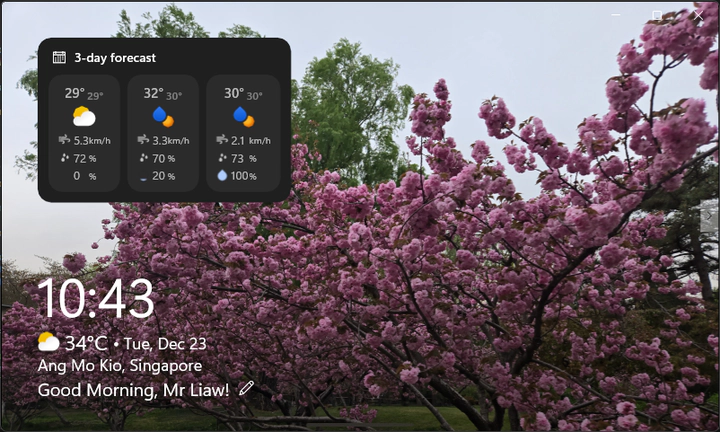 Image credit: Cayden
Table of Contents
 GitHub Repository
Overview
Vantage Hub is a multi-functional Windows UWP desktop application designed to serve as a personal smart hub. It combines essential daily utilities—weather forecasting, alarm management, media playback, AI-assisted chat, and digital sketching—into a unified, modern interface optimised for both touch and desktop interaction.
📚 Academic Project
This project was developed as part of EGE350 - Application Development & Cloud Services.
Screenshots 📸
Home Dashboard

Alarm Management

App Switcher

Sketching & AI Chatbot

Media Hub - Music Player


Media Hub - Radio


Media Hub - Video Player


Problem
Users often juggle multiple standalone apps for weather, alarms, music, and productivity tools, resulting in a fragmented desktop experience. Vantage Hub consolidates these core features into a single cohesive application that provides quick access to everyday utilities, reducing cognitive load and improving workflow efficiency.
Key Features
🏠 Home Dashboard
- Real-time Weather — 5-day forecast with dynamic weather icons, temperature, humidity, wind speed, and precipitation probability using OpenWeatherMap API
- Real-time Clock — Day/date/time with time-aware greeting (Morning / Afternoon / Evening / Night)
- Customizable Greetings — Personalize your dashboard greeting message
- Touch-first Interactions — Drag + transform support via manipulation handlers
⏰ Alarm & Stopwatch
- Smart Alarm System — Create, edit, and manage alarms with:
- Repeating days (weekday selection)
- Custom alarm sounds (6 built-in tones)
- Visual time-remaining countdown
- One-time alarms (auto-disabled after expiry)
- Stopwatch — Precision timer with start/pause/reset controls
- JSON Persistence — Alarms and preferences saved locally
🎵 Media Hub
- Local Music Player — Built-in music library with album art
- Play/Pause, Next/Previous track controls
- Shuffle (Fisher-Yates algorithm) and Loop modes
- Volume control with mute toggle
- Progress bar with seek functionality
- 🎶 All included music is royalty-free by Kevin MacLeod
- Live Radio Streaming — Browse and play Singapore radio stations via Radio Browser API
- Auto-filtered for working stations with valid cover art
- Metadata display (codec, bitrate, votes)
- Video Player — Play local video files (mp4, mkv) with fullscreen mode and file picker support
🎨 Doodle + AI Chat
- Digital Canvas — InkCanvas-based drawing with:
- Pen/Eraser tools with pressure support (stylus)
- Color picker and adjustable brush size
- Load background images for tracing
- Save drawings as PNG
- AI Chatbot — Powered by Google Gemini API
- Text-to-Speech (TTS) for responses
- Copy response to clipboard
- Speech Recognition — Voice input for chat using Windows Speech API
- Hover-to-Reveal Layout Swap — Switch button to swap Doodle and Chat panels
🔄 App Switcher
- Keyboard:
Ctrl + Spaceopens the app switcher; while holdingCtrl, pressSpaceto cycle; releasing selects (Alt+Tab style) - Gesture: Swipe up from the bottom interaction zone to open the app switcher (touch-friendly)
- Acrylic UI Effects — Modern Windows Fluent Design styling
Tech Stack
| Category | Technologies |
|---|---|
| Framework | UWP (Universal Windows Platform) |
| Language | C# |
| UI | XAML, Fluent Design System, Acrylic Effects |
| Weather API | OpenWeatherMap (5-day forecast) |
| AI Integration | Google Gemini (generative AI) |
| Radio API | Radio Browser |
| Speech | Windows.Media.SpeechRecognition, SpeechSynthesis |
| Inking | Windows.UI.Input.Inking (InkCanvas) |
| Serialisation | Newtonsoft.Json |
| Platform | Windows 10/11 (SDK 10.0.22621.0) |
API Keys & Services
This project uses external APIs that require authentication:
| Service | Purpose | Get API Key |
|---|---|---|
| OpenWeatherMap | Weather forecasts | openweathermap.org |
| Google Gemini | AI chatbot | ai.google.dev |
| Radio Browser | Radio stations | No key required |
Setting Up API Keys
- Copy
secrets.template.jsontosecrets.jsonin the project root - Add your API keys to the JSON file
- Note:
secrets.jsonis excluded from Git via.gitignoreto keep keys private
My Role
Sole developer responsible for:
- End-to-end UWP application architecture and UI/UX design
- Integration of external APIs (weather, radio, generative AI)
- Implementation of alarms (recurring + one-time), sound playback, and stopwatch utilities
- MediaHub development (music library, radio streaming, video playback)
- InkCanvas drawing tools + export pipeline
- Accessibility-focused features (speech-to-text + text-to-speech)
- Persistent storage for alarms and user preferences
Project Structure
| Folder/File | Description |
|---|---|
App.xaml(.cs) | Application entry point |
MainPage.xaml(.cs) | Home dashboard, weather, greetings, alarms, and stopwatch module |
Music.xaml(.cs) | MediaHub: music library + player, radio station browser, video playback |
Sketching.xaml(.cs) | InkCanvas doodle tools + AI chatbot (speech + TTS) + panel swap |
OpenWeatherMap.cs | Weather API integration + data models |
radio-API.cs | Radio station retrieval + streaming metadata client |
SecretsManager.cs | API key management |
secrets.json | Your API keys (not in Git) |
secrets.template.json | Template for secrets.json |
audio/ | Music & alarm sound files |
musicart/ | Album cover images |
weather_icons/ | SVG weather icons |
icons/ | UI icons for controls and navigation |
video/ | Sample video content |
Quick Start (User Controls)
- Switch apps:
Ctrl + Space(hold Ctrl, tap Space to cycle, release to select) - Touch switcher: Swipe up from the bottom zone to open the app switcher
- Doodle/Chat layout: Hover to reveal the switch button, then tap to swap panels
Permissions Required
The app requires the following capabilities (configured in Package.appxmanifest):
- Location — For weather based on current location
- Microphone — For speech recognition
- Internet — For API calls and radio streaming
Outcome
This project demonstrates proficiency in:
- UWP Development: Building a polished multi-page Windows application with touch-first UX
- API Integration: Consuming live data sources for weather, radio, and AI features
- Multi-feature Architecture: Coordinating alarms, media playback, AI chat, and inking within a cohesive UI
- Accessibility: Speech-to-text and text-to-speech for inclusive interaction
- State Management: Persistent storage, timers, and async flows across multiple modules